
macOS安装robotsuite缺少libz.1.dylib(no such file)
~/code/robosuite on master robot at 16:13:11
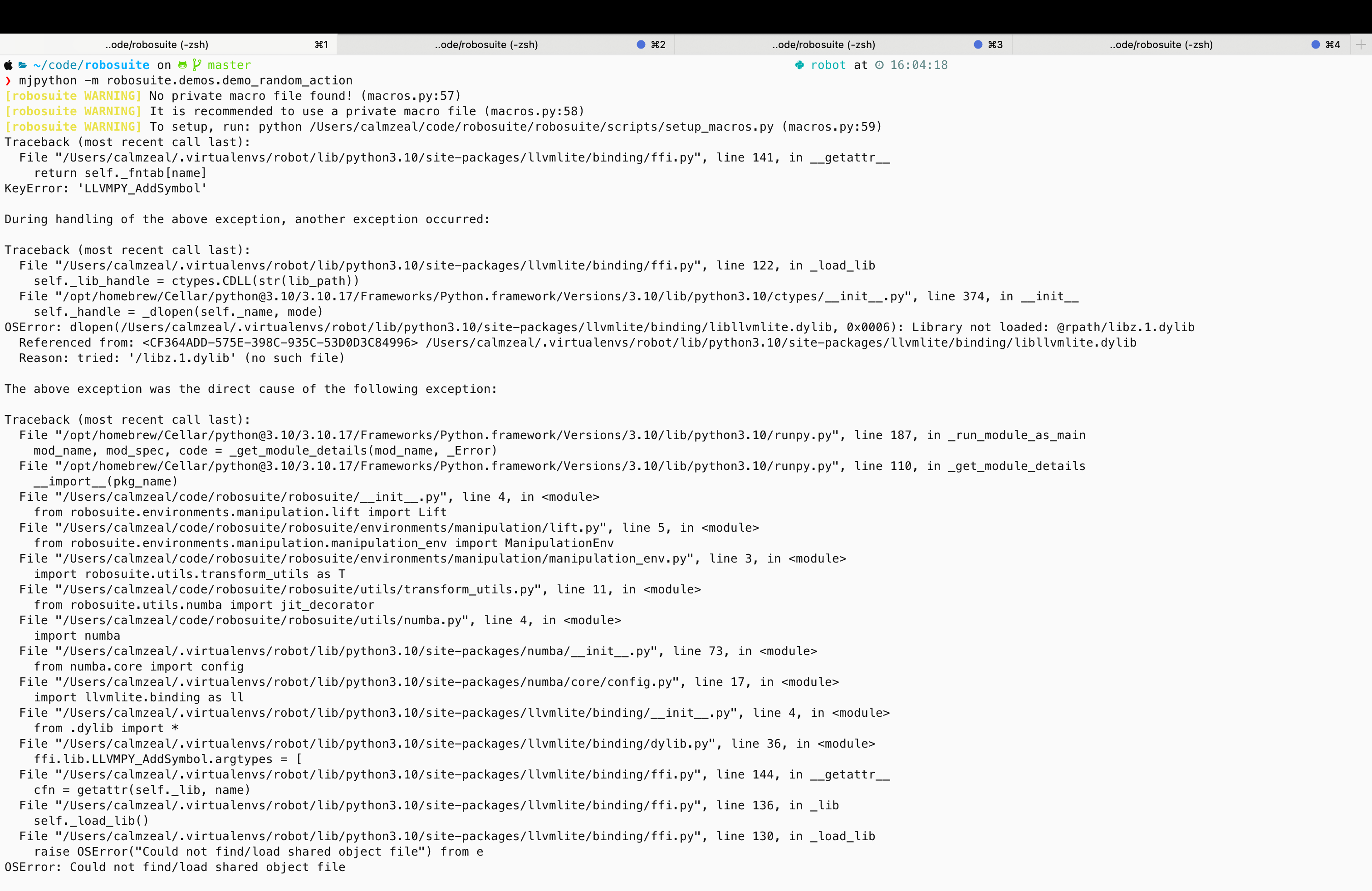
❯ mjpython -m robosuite.demos.demo_random_action
[robosuite WARNING] No private macro file found! (macros.py:57)
[robosuite WARNING] It is recommended to use a private macro file (macros.py:58)
[robosuite WARNING] To setup, run: python /Users/calmzeal/code/robosuite/robosuite/scripts/setup_macros.py (macros.py:59)
Traceback (most recent call last):
File "/Users/calmzeal/.virtualenvs/robot/lib/python3.10/site-packages/llvmlite/binding/ffi.py", line 141, in __getattr__
return self._fntab[name]
KeyError: 'LLVMPY_AddSymbol'
During handling of the above exception, another exception occurred:
Traceback (most recent call last):
File "/Users/calmzeal/.virtualenvs/robot/lib/python3.10/site-packages/llvmlite/binding/ffi.py", line 122, in _load_lib
self._lib_handle = ctypes.CDLL(str(lib_path))
File "/opt/homebrew/Cellar/python@3.10/3.10.17/Frameworks/Python.framework/Versions/3.10/lib/python3.10/ctypes/__init__.py", line 374, in __init__
self._handle = _dlopen(self._name, mode)
OSError: dlopen(/Users/calmzeal/.virtualenvs/robot/lib/python3.10/site-packages/llvmlite/binding/libllvmlite.dylib, 0x0006): Library not loaded: @rpath/libz.1.dylib
Referenced from: <CF364ADD-575E-398C-935C-53D0D3C84996> /Users/calmzeal/.virtualenvs/robot/lib/python3.10/site-packages/llvmlite/binding/libllvmlite.dylib
Reason: tried: '/libz.1.dylib' (no such file)
The above exception was the direct cause of the following exception:
Traceback (most recent call last):
File "/opt/homebrew/Cellar/python@3.10/3.10.17/Frameworks/Python.framework/Versions/3.10/lib/python3.10/runpy.py", line 187, in _run_module_as_main
mod_name, mod_spec, code = _get_module_details(mod_name, _Error)
File "/opt/homebrew/Cellar/python@3.10/3.10.17/Frameworks/Python.framework/Versions/3.10/lib/python3.10/runpy.py", line 110, in _get_module_details
__import__(pkg_name)
File "/Users/calmzeal/code/robosuite/robosuite/__init__.py", line 4, in <module>
from robosuite.environments.manipulation.lift import Lift
File "/Users/calmzeal/code/robosuite/robosuite/environments/manipulation/lift.py", line 5, in <module>
from robosuite.environments.manipulation.manipulation_env import ManipulationEnv
File "/Users/calmzeal/code/robosuite/robosuite/environments/manipulation/manipulation_env.py", line 3, in <module>
import robosuite.utils.transform_utils as T
File "/Users/calmzeal/code/robosuite/robosuite/utils/transform_utils.py", line 11, in <module>
from robosuite.utils.numba import jit_decorator
File "/Users/calmzeal/code/robosuite/robosuite/utils/numba.py", line 4, in <module>
import numba
File "/Users/calmzeal/.virtualenvs/robot/lib/python3.10/site-packages/numba/__init__.py", line 73, in <module>
from numba.core import config
File "/Users/calmzeal/.virtualenvs/robot/lib/python3.10/site-packages/numba/core/config.py", line 17, in <module>
import llvmlite.binding as ll
File "/Users/calmzeal/.virtualenvs/robot/lib/python3.10/site-packages/llvmlite/binding/__init__.py", line 4, in <module>
from .dylib import *
File "/Users/calmzeal/.virtualenvs/robot/lib/python3.10/site-packages/llvmlite/binding/dylib.py", line 36, in <module>
ffi.lib.LLVMPY_AddSymbol.argtypes = [
File "/Users/calmzeal/.virtualenvs/robot/lib/python3.10/site-packages/llvmlite/binding/ffi.py", line 144, in __getattr__
cfn = getattr(self._lib, name)
File "/Users/calmzeal/.virtualenvs/robot/lib/python3.10/site-packages/llvmlite/binding/ffi.py", line 136, in _lib
self._load_lib()
File "/Users/calmzeal/.virtualenvs/robot/lib/python3.10/site-packages/llvmlite/binding/ffi.py", line 130, in _load_lib
raise OSError("Could not find/load shared object file") from e
OSError: Could not find/load shared object file
code ~/code/robosuite on master robot at 16:13:11
❯ mjpython -m robosuite.demos.demo_random_action
[robosuite WARNING] No private macro file found! (macros.py:57)
[robosuite WARNING] It is recommended to use a private macro file (macros.py:58)
[robosuite WARNING] To setup, run: python /Users/calmzeal/code/robosuite/robosuite/scripts/setup_macros.py (macros.py:59)
Traceback (most recent call last):
File "/Users/calmzeal/.virtualenvs/robot/lib/python3.10/site-packages/llvmlite/binding/ffi.py", line 141, in __getattr__
return self._fntab[name]
KeyError: 'LLVMPY_AddSymbol'
During handling of the above exception, another exception occurred:
Traceback (most recent call last):
File "/Users/calmzeal/.virtualenvs/robot/lib/python3.10/site-packages/llvmlite/binding/ffi.py", line 122, in _load_lib
self._lib_handle = ctypes.CDLL(str(lib_path))
File "/opt/homebrew/Cellar/python@3.10/3.10.17/Frameworks/Python.framework/Versions/3.10/lib/python3.10/ctypes/__init__.py", line 374, in __init__
self._handle = _dlopen(self._name, mode)
OSError: dlopen(/Users/calmzeal/.virtualenvs/robot/lib/python3.10/site-packages/llvmlite/binding/libllvmlite.dylib, 0x0006): Library not loaded: @rpath/libz.1.dylib
Referenced from: <CF364ADD-575E-398C-935C-53D0D3C84996> /Users/calmzeal/.virtualenvs/robot/lib/python3.10/site-packages/llvmlite/binding/libllvmlite.dylib
Reason: tried: '/libz.1.dylib' (no such file)
The above exception was the direct cause of the following exception:
Traceback (most recent call last):
File "/opt/homebrew/Cellar/python@3.10/3.10.17/Frameworks/Python.framework/Versions/3.10/lib/python3.10/runpy.py", line 187, in _run_module_as_main
mod_name, mod_spec, code = _get_module_details(mod_name, _Error)
File "/opt/homebrew/Cellar/python@3.10/3.10.17/Frameworks/Python.framework/Versions/3.10/lib/python3.10/runpy.py", line 110, in _get_module_details
__import__(pkg_name)
File "/Users/calmzeal/code/robosuite/robosuite/__init__.py", line 4, in <module>
from robosuite.environments.manipulation.lift import Lift
File "/Users/calmzeal/code/robosuite/robosuite/environments/manipulation/lift.py", line 5, in <module>
from robosuite.environments.manipulation.manipulation_env import ManipulationEnv
File "/Users/calmzeal/code/robosuite/robosuite/environments/manipulation/manipulation_env.py", line 3, in <module>
import robosuite.utils.transform_utils as T
File "/Users/calmzeal/code/robosuite/robosuite/utils/transform_utils.py", line 11, in <module>
from robosuite.utils.numba import jit_decorator
File "/Users/calmzeal/code/robosuite/robosuite/utils/numba.py", line 4, in <module>
import numba
File "/Users/calmzeal/.virtualenvs/robot/lib/python3.10/site-packages/numba/__init__.py", line 73, in <module>
from numba.core import config
File "/Users/calmzeal/.virtualenvs/robot/lib/python3.10/site-packages/numba/core/config.py", line 17, in <module>
import llvmlite.binding as ll
File "/Users/calmzeal/.virtualenvs/robot/lib/python3.10/site-packages/llvmlite/binding/__init__.py", line 4, in <module>
from .dylib import *
File "/Users/calmzeal/.virtualenvs/robot/lib/python3.10/site-packages/llvmlite/binding/dylib.py", line 36, in <module>
ffi.lib.LLVMPY_AddSymbol.argtypes = [
File "/Users/calmzeal/.virtualenvs/robot/lib/python3.10/site-packages/llvmlite/binding/ffi.py", line 144, in __getattr__
cfn = getattr(self._lib, name)
File "/Users/calmzeal/.virtualenvs/robot/lib/python3.10/site-packages/llvmlite/binding/ffi.py", line 136, in _lib
self._load_lib()
File "/Users/calmzeal/.virtualenvs/robot/lib/python3.10/site-packages/llvmlite/binding/ffi.py", line 130, in _load_lib
raise OSError("Could not find/load shared object file") from e
OSError: Could not find/load shared object file
code 问题
运行Python程序时遇到以下错误:
			OSError: dlopen(...): Library not loaded: @rpath/libz.1.dylib
Referenced from: .../libllvmlite.dylib
Reason: tried: '/libz.1.dylib' (no such file)
code OSError: dlopen(...): Library not loaded: @rpath/libz.1.dylib
Referenced from: .../libllvmlite.dylib
Reason: tried: '/libz.1.dylib' (no such file)
code 简单修复步骤
- 找到系统中的libz.1.dylib文件位置:
find /usr /opt/homebrew /Library -name "libz*.dylib"
code find /usr /opt/homebrew /Library -name "libz*.dylib"
code 示例输出显示位置可能在:/opt/homebrew/Cellar/zlib/1.3.1/lib/libz.1.dylib
~/code/robosuite on master took 9s robot at 16:12:21
❯ find /usr/lib /opt/homebrew -name "libz*.dylib"
/usr/lib/libz.1.2.12.dylib
/opt/homebrew/lib/libzimg.2.dylib
/opt/homebrew/lib/libzmq.dylib
/opt/homebrew/lib/libzimg.dylib
/opt/homebrew/lib/libzstd.1.dylib
/opt/homebrew/lib/libzmq.5.dylib
/opt/homebrew/lib/libzstd.dylib
/opt/homebrew/lib/libzstd.1.5.7.dylib
/opt/homebrew/Cellar/zimg/3.0.5/lib/libzimg.2.dylib
/opt/homebrew/Cellar/zimg/3.0.5/lib/libzimg.dylib
/opt/homebrew/Cellar/zeromq/4.3.5_1/lib/libzmq.dylib
/opt/homebrew/Cellar/zeromq/4.3.5_1/lib/libzmq.5.dylib
/opt/homebrew/Cellar/zlib/1.3.1/lib/libz.dylib
/opt/homebrew/Cellar/zlib/1.3.1/lib/libz.1.3.1.dylib
/opt/homebrew/Cellar/zlib/1.3.1/lib/libz.1.dylib
/opt/homebrew/Cellar/zstd/1.5.7/lib/libzstd.1.dylib
/opt/homebrew/Cellar/zstd/1.5.7/lib/libzstd.dylib
/opt/homebrew/Cellar/zstd/1.5.7/lib/libzstd.1.5.7.dylib
code ~/code/robosuite on master took 9s robot at 16:12:21
❯ find /usr/lib /opt/homebrew -name "libz*.dylib"
/usr/lib/libz.1.2.12.dylib
/opt/homebrew/lib/libzimg.2.dylib
/opt/homebrew/lib/libzmq.dylib
/opt/homebrew/lib/libzimg.dylib
/opt/homebrew/lib/libzstd.1.dylib
/opt/homebrew/lib/libzmq.5.dylib
/opt/homebrew/lib/libzstd.dylib
/opt/homebrew/lib/libzstd.1.5.7.dylib
/opt/homebrew/Cellar/zimg/3.0.5/lib/libzimg.2.dylib
/opt/homebrew/Cellar/zimg/3.0.5/lib/libzimg.dylib
/opt/homebrew/Cellar/zeromq/4.3.5_1/lib/libzmq.dylib
/opt/homebrew/Cellar/zeromq/4.3.5_1/lib/libzmq.5.dylib
/opt/homebrew/Cellar/zlib/1.3.1/lib/libz.dylib
/opt/homebrew/Cellar/zlib/1.3.1/lib/libz.1.3.1.dylib
/opt/homebrew/Cellar/zlib/1.3.1/lib/libz.1.dylib
/opt/homebrew/Cellar/zstd/1.5.7/lib/libzstd.1.dylib
/opt/homebrew/Cellar/zstd/1.5.7/lib/libzstd.dylib
/opt/homebrew/Cellar/zstd/1.5.7/lib/libzstd.1.5.7.dylib
code - 创建符号链接到Python环境:
			ln -s /opt/homebrew/Cellar/zlib/1.3.1/lib/libz.1.dylib ~/.virtualenvs/robot/lib/libz.1.dylib
export DYLD_LIBRARY_PATH=/opt/homebrew/Cellar/zlib/1.3.1/lib:/usr/lib:$DYLD_LIBRARY_PATH
code ln -s /opt/homebrew/Cellar/zlib/1.3.1/lib/libz.1.dylib ~/.virtualenvs/robot/lib/libz.1.dylib
export DYLD_LIBRARY_PATH=/opt/homebrew/Cellar/zlib/1.3.1/lib:/usr/lib:$DYLD_LIBRARY_PATH
code - 修复库引用路径:
			install_name_tool -change @rpath/libz.1.dylib /opt/homebrew/Cellar/zlib/1.3.1/lib/libz.1.dylib \
~/.virtualenvs/robot/lib/python3.10/site-packages/llvmlite/binding/libllvmlite.dylib
code install_name_tool -change @rpath/libz.1.dylib /opt/homebrew/Cellar/zlib/1.3.1/lib/libz.1.dylib \
~/.virtualenvs/robot/lib/python3.10/site-packages/llvmlite/binding/libllvmlite.dylib
code 这个问题是因为Python库llvmlite找不到libz.1.dylib压缩库。上述步骤创建了必要的链接,并修复了库引用路径,让程序能够找到需要的系统库。RetryClaude does not have the ability to run the code it generates yet.Claude can make mistakes. Please double-check responses.